
Bespoke Xero Migrations: Why “Moving Data” Isn’t Enough
When businesses think about a migration, the assumption is simple: move the data from the old system into Xero and carry on. But our bespoke Xero migrations say differently.
At Migrate My Accounts, we don’t just migrate data.
We restructure, refine, and optimise it so your reporting works not just for the past, but for the future.
What Does a Xero Bespoke Migration Actually Mean?
A bespoke migration is not about speed.
It’s about quality, structure, and long-term value.
It means using your historical data as an opportunity to:
- Improve reporting clarity
- Fix structural issues from legacy systems
- Remove inefficiencies
- Align your accounts with how your business actually operates today
This is particularly important when migrating from systems like:
- Sage 200 to Xero
- Sage 50 to Xero
- Access Dimensions to Xero
- Exchequer to Xero
These systems often carry years of complexity, workarounds, and inconsistencies.
Simply transferring that “as is” into Xero?
You’re just bringing the problems with you.
Why automated migration tools fall short and what is the difference from Xero bespoke migrations
Automated tools have their place.
They are fast, cost-effective, and useful for simpler setups.
But here’s the reality:
Data is just imported as a copy paste.
They won’t:
- Question your chart of accounts
- Identify duplicate or messy contacts
- Spot reporting inconsistencies
- Fix structural issues
- Improve how your business uses data
They simply replicate what’s already there.
And in many cases, especially with Sage 50 to Xero migrations, this creates:
- Overcomplicated charts of accounts
- Poor reporting visibility
- Duplicate contacts
- Broken or inconsistent tracking
- VAT inconsistencies
- Historical inaccuracies carried forward
The Power of a Bespoke Approach
A proper migration should feel like a reset with purpose, not just a transfer.
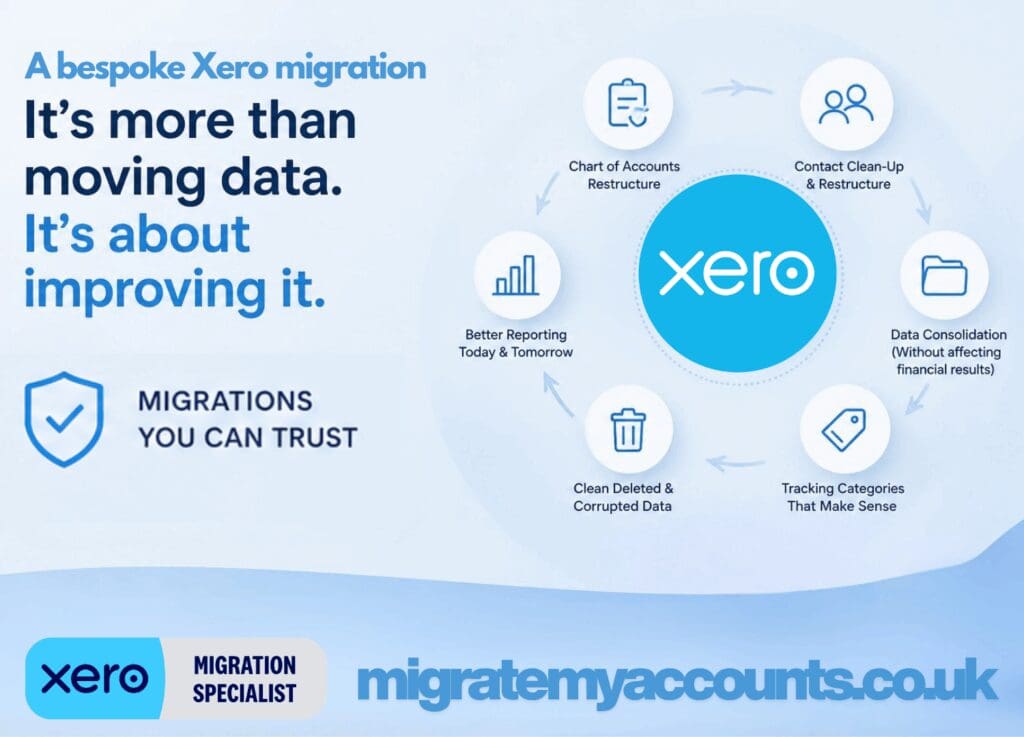
Here’s what we actively improve during a bespoke Xero migration:
1. Chart of Accounts (CoA) Restructure
Legacy systems often have:
- Hundreds of unnecessary nominal codes
- Duplicates created over time
- Poor categorisation
- No alignment with modern reporting
We restructure your chart of accounts to:
- Simplify reporting
- Align with Xero best practices
- Improve clarity for management and accountants
- Support future growth
2. Contact Restructure & Clean-Up
Older systems (especially Sage and Exchequer) allow:
- Duplicate customer/supplier records
- Inconsistent naming
- Poor data hygiene
We clean and restructure contacts so you have:
- One clear version of each customer/supplier
- Accurate aged reports
- Better credit control and reporting
3. Data Consolidation (Without Affecting Financial Results)
Not all historical detail is useful.
For businesses with high transaction volumes (retail, hospitality, stock-heavy operations), we often:
- Consolidate daily transactions
- Simplify historical data
- Maintain financial accuracy while reducing noise
This ensures:
- Faster performance in Xero
- Cleaner reports
- Easier navigation
All without impacting the financial outcome.
4. Cleaning Deleted & Corrupted Data
This is a big one.
In many legacy systems, we regularly find:
- Deleted nominal accounts posting to suspense
- Transactions sitting in incorrect periods
- Broken audit trails
- Imbalances between Trial Balance and Aged Reports
We identify and clean these issues before they become your problem in Xero.
5. Tracking Categories That Actually Work
Xero allows only two tracking categories.
Many systems we migrate from use:
- Cost centres
- Departments
- Analysis codes
We carefully map and restructure these into Xero tracking so they:
- Make sense
- Support reporting
- Don’t overcomplicate your setup
Sometimes that means removing unnecessary tracking entirely.
6. FX, VAT & Structural Adjustments – How our Xero bespoke migrations help
We don’t ignore complexity.
We manage it properly.
From experience, we know:
- Exchange differences will happen (especially from systems like Sage 200)
- VAT history won’t always align perfectly due to late reconciliations
- Period-based systems behave very differently to Xero
A bespoke migration ensures:
- These differences are understood
- They are controlled
- They are documented
Why Sage 50 to Xero Needs Special Attention
If there’s one migration that gets underestimated the most, it’s:
Sage 50 to Xero
Because it looks simple.
But in reality, Sage 50 often contains:
- Years of inconsistent posting
- Manual workarounds
- Poor contact structures
- Overused nominal codes
- Limited reporting setup
Automated tools will move it.
But they won’t improve it.
This is where Xero experts make the difference.
Migrations You Can Trust
A successful migration is not just about:
✔ Data being in Xero
✔ Numbers “looking right”
It’s about:
- Confidence in your reports
- Clean, structured data
- A system that works for your business
- No hidden issues waiting to surface
At Migrate My Accounts, we:
- Work in dedicated Xero trial environments
- Reconcile everything from a double-entry perspective
- Provide full documentation and validation
- We support you post-migration (including VAT and training)
The Bottom Line
If your migration is purely about “getting into Xero” automation might be enough.
But if you want:
- Better reporting
- Cleaner data
- A future-proof setup
- A system that actually works for you
Then you need a bespoke Xero migration.
Looking for a Bespoke Xero Migration Partner?
If you’re planning:
- Sage 50 to Xero
- Sage 200 to Xero
- Access Dimensions to Xero
- Exchequer to Xero
And want a migration that adds value, not just moves data…
You’re in the right place.
👉 Get in touch with Xero migration experts you can trust. We are the Xero Migration Partners you can trust.