
What Happens to Your Historical Data When Moving From Sage 200 to Xero?
Moving from Sage 200 to Xero raises a question that is often more important than the software itself: what happens to your Sage 200 historical data?
For businesses that have used Sage 200 for many years, that historical data can contain years of customer and supplier transactions, nominal activity, VAT or tax information, bank transactions, departmental reporting and the audit trail behind previous financial statements.
This is why moving to Xero should not simply be treated as a question of transferring opening balances.
There are several ways to approach a Sage 200 to Xero migration, and the right option depends on how much historical information the business needs to retain, how that information is currently structured and how the finance team expects to use Xero afterwards.
The same challenge applies regardless of where the business is based. We support accounting data migrations for organisations in the UK and internationally, including businesses operating across Europe, the United States, Australia, New Zealand, South Africa and other regions where Xero is used.
While accounting, tax and record-retention requirements differ between countries, the underlying migration question remains the same: how do you move to a new accounting platform without losing the financial history your business still relies on?
Why Is Sage 200 Historical Data Important When Migrating?
In most cases, yes.
That does not necessarily mean that every piece of information from Sage 200 needs to be recreated inside Xero, but businesses should have a clear plan for retaining the financial records they may need for:
- statutory record keeping
- audits
- tax or VAT enquiries
- customer and supplier queries
- management reporting
- year-on-year comparisons
- transaction investigations
- historical project or departmental analysis
This becomes particularly important when Sage 200 is being decommissioned or the business intends to stop paying for access to the old system.
Keeping Sage 200 available purely as an archive may initially sound like the easiest option. However, businesses should consider how long that access will remain available, what it will cost and whether future employees or auditors will actually be able to retrieve the information they need.
Can Historical Sage 200 Data Be Migrated to Xero?
Yes. A Sage 200 to Xero migration does not have to be limited to opening balances.
Depending on the data and migration approach, it is possible to transfer multiple years of detailed historical transactions into Xero.
At Migrate My Accounts, we regularly migrate historical financial information from Sage 200 rather than simply bringing across a trial balance at the conversion date.
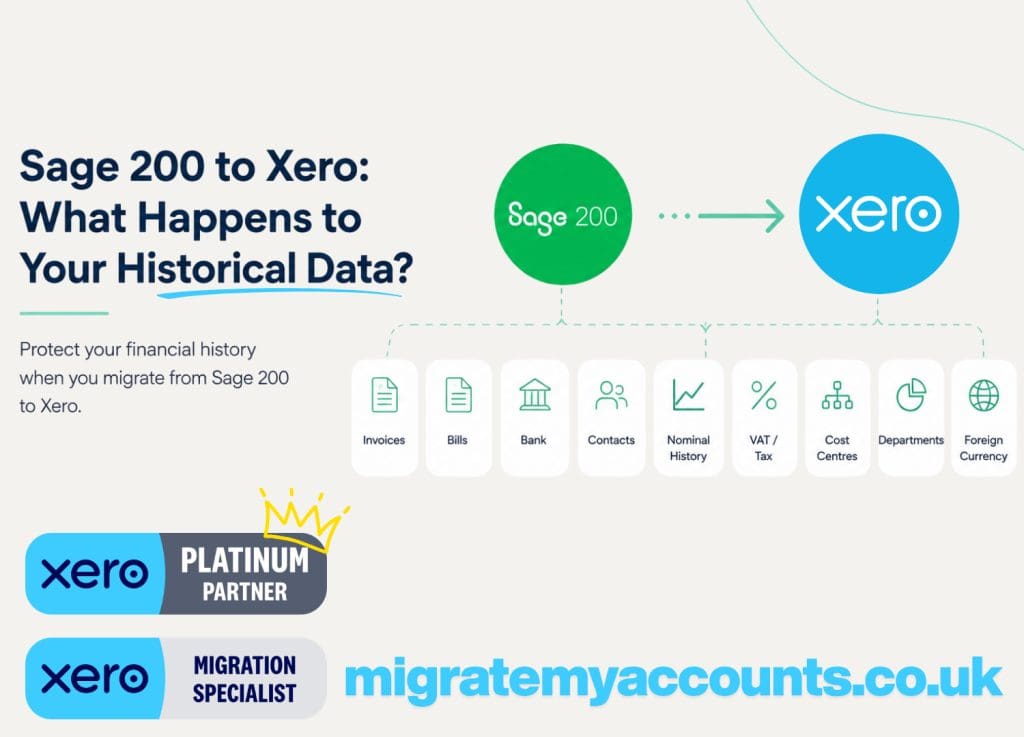
The migration can include information such as:
- sales invoices and credit notes
- purchase invoices and credit notes
- customer and supplier payments
- bank transactions
- nominal ledger activity
- journals
- VAT or tax amounts and treatment
- transaction references
- customer and supplier balances
- foreign currency information
- cost centres and departments
The objective is not simply to make the Xero opening trial balance agree.
The objective is to create a usable historical accounting record that can be reconciled back to Sage 200.
Opening Balances vs Full Historical Migration
This is one of the biggest decisions when moving from Sage 200.
Option 1: Opening balances
With an opening balance migration, the business starts using Xero from an agreed conversion date.
Instead of recreating previous years of transactions, balances are brought into Xero at that point.
This is usually the quickest migration approach and may be perfectly suitable where historical information is unlikely to be required inside Xero.
However, when someone later asks:
“Why did this customer owe us £24,000 last year?”
or
“What made up this nominal balance?”
the answer may still need to be found in Sage 200 or another archive.
Option 2: Historical transaction migration
A historical migration brings previous accounting transactions into Xero as well as the current balances.
This means finance teams can continue looking backwards without constantly switching between two systems.
For many businesses, we recommend retaining at least two complete financial years for comparative reporting, although significantly more history can be migrated where required.
We have completed migrations involving many years of historical accounting information, including projects where retaining the old financial history was a fundamental requirement rather than an optional extra.
How Many Years of Sage 200 Historical Data Can Be Moved?
There is no universal answer.
Some businesses only need the previous financial year and the current year. Others want five, seven or even ten years of history available.
The decision should be based on the usefulness of the information rather than an arbitrary migration limit.
Before deciding, consider:
Reporting requirements. How many comparative years does the finance team regularly analyse?
Audit requirements. How easily could historical transactions be retrieved if Sage 200 was no longer available?
Customer and supplier history. Does the business regularly investigate older transactions?
Data volume. Ten years of activity for a small organisation is very different from ten years for a high-volume group.
Quality of the historical data. Sometimes a migration is also an opportunity to stop carrying forward unnecessary structures that have accumulated over many years.
The important question therefore isn’t simply:
“How much data can we migrate?”
It is:
“How much historical data will still be useful after the migration?”
What Happens to Sage 200 Cost Centres and Departments?
Historical migration becomes more complicated when Sage 200 has been used for detailed management reporting.
Many businesses use cost centres, departments or other coding structures extensively.
Xero does not mirror Sage 200’s structure exactly, so these dimensions need to be reviewed before the migration.
Where appropriate, Sage 200 cost centres and departments can be mapped into Xero Tracking categories.
However, this should not automatically mean reproducing every historical code exactly as it exists.
A migration is often a useful opportunity to review whether the existing reporting structure still makes sense.
Old departments may no longer exist.
Several cost centres may now serve the same purpose.
Codes may have been created years ago and never removed.
Instead of blindly reproducing the old system, the mapping should consider how the business wants to report after moving to Xero.
What Happens to the Sage 200 Chart of Accounts?
The same principle applies to the nominal ledger.
A Sage 200 chart of accounts can contain hundreds of nominal codes accumulated over many years.
Not all of them necessarily need to exist in the new Xero organisation.
Before migrating, businesses can decide whether to:
- retain the existing chart of accounts
- consolidate unnecessary nominal codes
- rename accounts
- reorganise the reporting structure
- create a new Xero chart of accounts and map the historical data into it
This is where data migration and data restructuring begin to overlap.
A migration can be an opportunity to simplify the financial structure rather than simply transporting years of legacy decisions into a new platform.
What About Foreign Currency Transactions?
Multi-currency migrations need some extra care.
If Sage 200 used specific exchange rates for historical transactions, applying a new exchange rate during the migration could change the accounting history.
To preserve that history, the migration should use the original currency values and exchange rates where appropriate. This helps the resulting base-currency values reconcile back to Sage 200 and keeps the historical financial position accurate.
This becomes particularly important for international businesses, multi-entity groups and organisations operating across different currencies.
It is also important for historical customer and supplier transactions where outstanding balances and allocations need to remain understandable after the migration.
Can Sage 200 Customer and Supplier History Be Retained?
Yes.
Historical migration can preserve significantly more information than a simple list of contacts.
Depending on the scope, customers and suppliers can be migrated together with their historical invoices, credit notes, payments and outstanding balances.
This allows users to open a contact in Xero and see meaningful transaction history rather than beginning with a single brought-forward figure.
For finance teams dealing with long-standing customers and suppliers, that historical visibility can make the transition considerably easier.
What About the Audit Trail?
This is one of the reasons reconciliation is such an important part of accounting data migration.
A successful migration should not be judged by whether transactions simply appear in Xero.
The migrated information should be validated against the source system.
Depending on the project, this can include reconciliation of:
- trial balances
- aged debtors
- aged creditors
- bank balances
- VAT or tax information
- control accounts
- historical periods
Where differences exist because Sage 200 and Xero handle a particular accounting situation differently, those differences should be identified and explained.
The exact statutory, tax and financial record-retention requirements will depend on the country in which the business operates. A UK company may have different obligations from a business in Australia, New Zealand, the United States or South Africa.
From a migration perspective, however, the principle is universal: the business should be able to understand where its historical financial information has gone, retrieve the records it still needs and demonstrate that the migrated accounting data reconciles to the source system.
The goal is to leave the finance team with evidence that the information in Xero reflects the financial history that existed before the migration.
Should You Clean the Historical Data Before Moving From Sage 200?
Usually, yes, but carefully.
Migration provides an opportunity to improve the structure of the accounting data, particularly where Sage 200 has been used for many years.
Common areas worth reviewing include duplicate contacts, unused nominal codes, obsolete departments and cost centres, unallocated credit notes, old payments on account and unusual outstanding balances.
However, “cleaning” financial data should not mean altering historical accounting records simply to make the new system look tidier.
There is an important difference between restructuring data and changing accounting history.
A good migration preserves the financial record while improving how useful information is organised going forward.
Do You Have to Keep Sage 200 After Migrating to Xero?
That depends on how much historical information you move to Xero and which records you keep separately.
If you migrate only opening balances, you may still need access to Sage 200 or a suitable historical archive because Xero will not contain the underlying transaction history.
If you migrate and reconcile detailed historical information, your organisation may no longer need to rely as heavily on the old system.
Make this decision before you cancel Sage 200 licences, hosting arrangements or server access.
Discovering six months after migration that somebody needs information which was only available in the old system is not an ideal archive strategy.
Before Cancelling Sage 200, Ask These Questions
Before removing access to the old system, make sure you can answer:
- How many years of financial history do we need?
- Where will that history be stored?
- Can we retrieve individual historical transactions?
- Do we need customer and supplier history?
- Have tax and VAT records been retained?
- Do we need historical departmental or cost-centre reporting?
- Can the migrated balances be reconciled to Sage 200?
- What information has deliberately not been migrated?
- Have important reports been archived?
- Could an auditor understand how the closing Sage 200 position became the opening or historical position in Xero?
If any of those answers are unclear, the historical-data strategy probably needs more consideration before the old system is switched off.
Moving From Sage 200 to Xero Without Losing Your Financial History
Moving to a simpler accounting platform does not have to mean losing access to the information accumulated in your previous system.
The important part is deciding what needs to be retained before the migration starts.
For some businesses, opening balances are sufficient.
For others, having several years of searchable customer, supplier, nominal and bank history inside Xero is extremely valuable.
And for organisations leaving Sage 200 because of licensing costs, infrastructure changes or a wider move to cloud accounting, retaining that history may be one of the most important parts of the entire project.
At Migrate My Accounts, we specialise in complex and historical accounting data migrations into Xero for businesses in the UK and internationally. Our migration work can be delivered remotely, allowing us to support organisations across different countries and time zones without requiring access to an on-site finance team.
This includes Sage 200 migrations involving multiple financial years, group companies, foreign currency, cost centres and departments, and businesses with operations spanning more than one country.
The software move may be the visible part of the project.
But protecting the financial history behind it is what makes the migration dependable.
Frequently Asked Questions
Can you migrate historical Sage 200 data to Xero?
Yes. A migration can include detailed historical transactions rather than only opening balances. The exact scope depends on the data available and the number of years the business wants to retain.
How many years of Sage 200 data can be migrated to Xero?
There is no fixed number. Businesses may choose a few comparative years or significantly longer periods depending on their reporting, audit and operational requirements.
Can Sage 200 cost centres and departments be migrated to Xero?
They can often be mapped to Xero Tracking categories. The structure should be reviewed before migration because Sage 200 and Xero organise management reporting differently.
Can customer and supplier transaction history be migrated?
Yes. Historical invoices, credit notes, payments and balances can form part of a detailed migration, allowing useful contact history to remain accessible in Xero.
Can Sage 200 to Xero migrations be completed for businesses outside the UK?
Yes. Accounting data migrations can be completed remotely for businesses based outside the UK, including organisations moving to Xero in Australia, New Zealand, the United States, South Africa and other countries.
The migration methodology remains focused on preserving and reconciling the historical accounting data, although local tax, reporting and statutory record-retention requirements should always be considered separately.
Can a Sage 200 to Xero migration include multiple currencies?
Yes. Multi-currency and international migrations can include historical foreign currency information, although the original transaction values, exchange rates and resulting base-currency balances need to be carefully considered as part of the migration and reconciliation process.
Should I cancel Sage 200 immediately after moving to Xero?
Not until you have confirmed that the required historical information has either been successfully migrated or securely archived and that the migrated data has been reconciled.
Planning a Sage 200 to Xero Migration?
Moving years of accounting history between systems isn’t something we believe should be treated as a simple data import.
At Migrate My Accounts, accounting data migration is what we do every day. We have completed 1,000+ accounting migrations and migrated more than 30 million transactions, working with businesses ranging from individual companies to complex multi-entity groups.
Our migrations are delivered remotely, so we can support businesses in the UK and internationally, including organisations across Europe, Australia, New Zealand, the United States and South Africa.
If you’re considering moving away from Sage 200 and aren’t sure how much historical data you need, what can realistically be transferred or how your existing accounting structure would work in Xero, we’re happy to discuss it with you before you make that decision.
→ Learn more about Migrate My Accounts and our migration experience